avday
avday Sorted by stars, 9 of the top 15 GitHub results for “roblox mcp” come from 437 lookalike repos created in under three hours on 22 September. You need none of them.
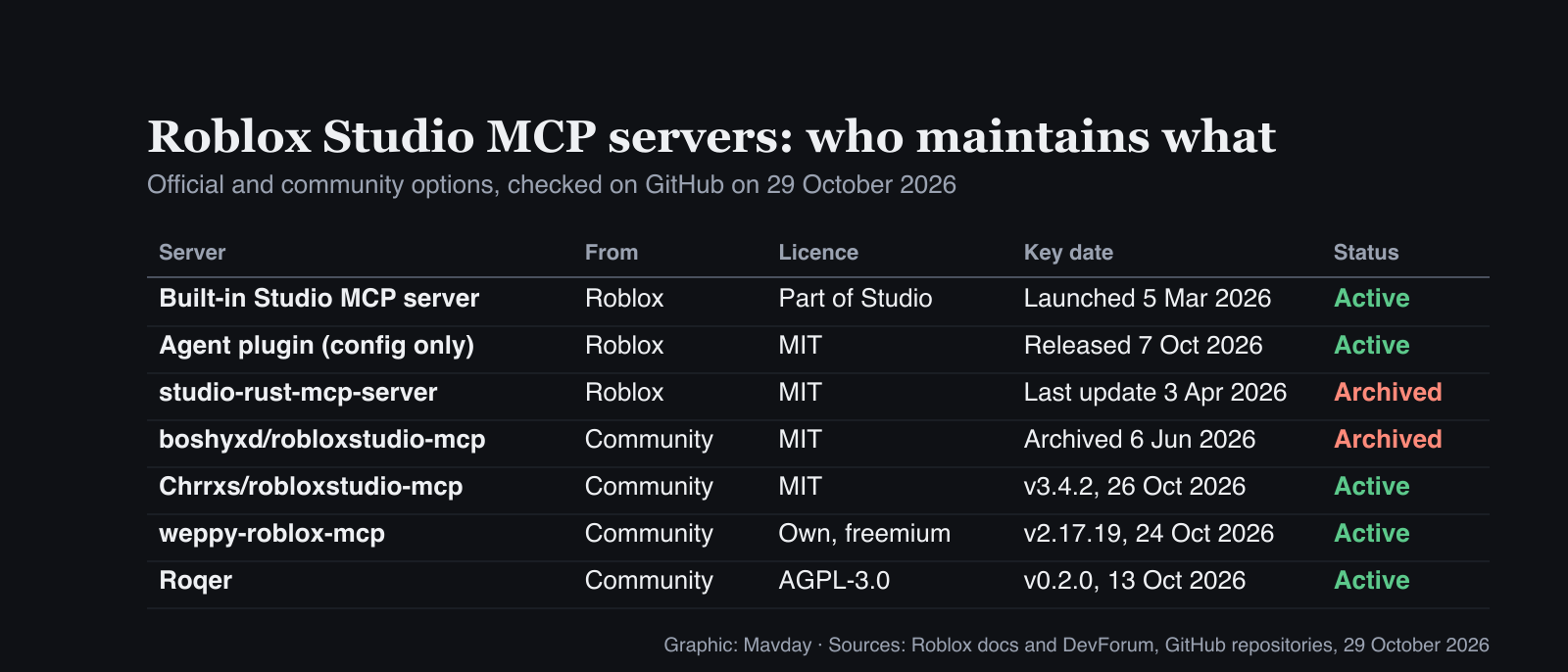
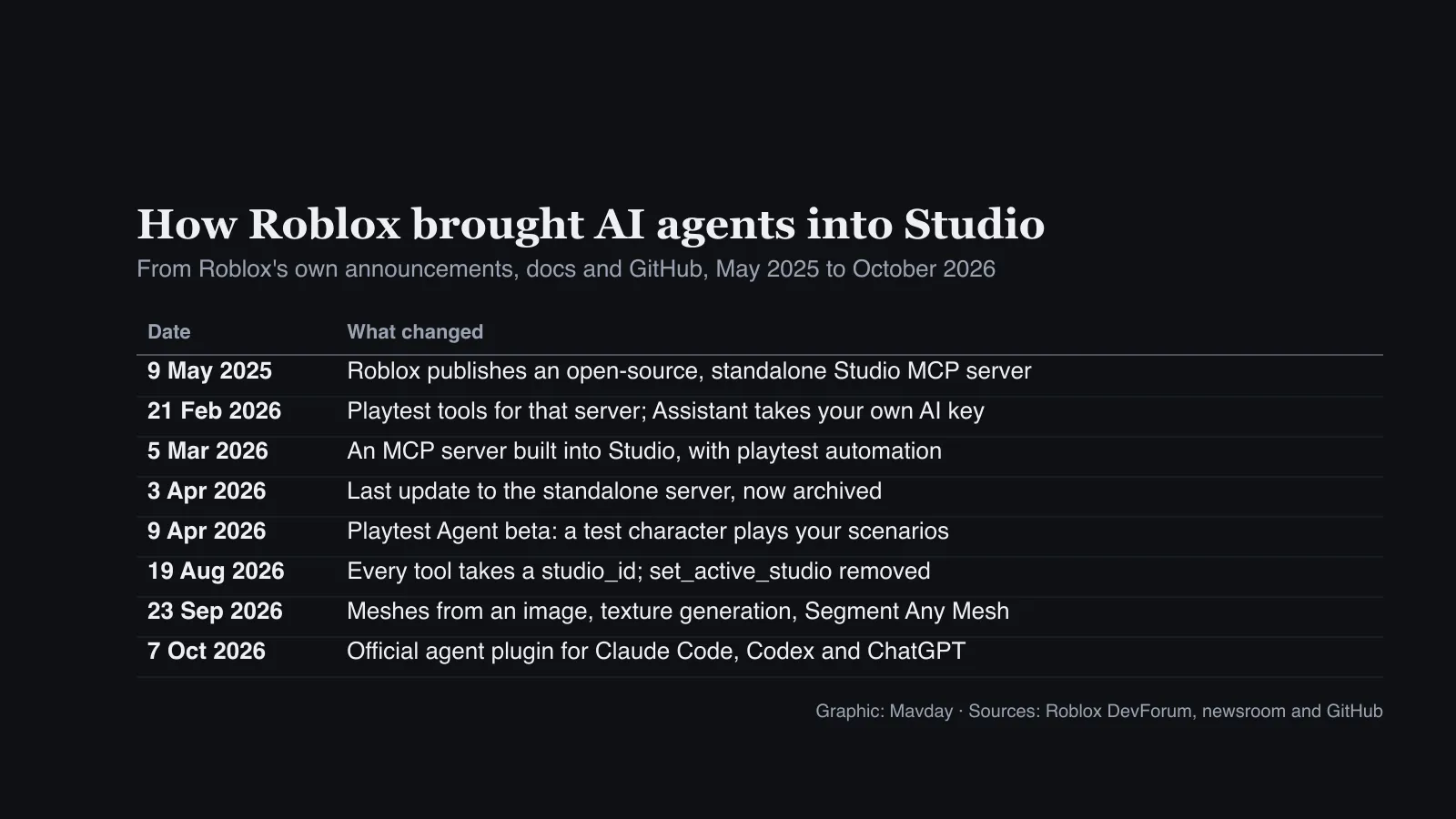
The Roblox Studio MCP server is built in, switched on from one toggle in Assistant’s settings. Claude Code, Codex and other local clients can connect to it. Roblox archived its standalone server after a final update on 3 April, and the most-starred community server was archived on 6 June.
What you need first
- Roblox Studio on macOS or Windows, the latest version, signed in. The docs say the server “runs as a local process on your machine” and talks over
stdio, so web chat apps can’t reach it. - A local agent with Roblox’s plugin: Claude Code, Cowork in the Claude desktop app, the ChatGPT desktop app or the Codex CLI.
- Or a quick-connect client: Studio can also set up Antigravity, Claude Desktop, Cursor, Gemini CLI and VS Code.
- A throwaway place. Start with a fresh local Baseplate, not your published game. The plugin’s README warns: “Not every change can be undone from Studio.”
- No Roblox API key. Neither Roblox’s docs nor the plugin’s setup asks for one. You do need whatever plan your agent normally needs.
Turn on the Roblox Studio MCP server
Roblox calls this the built-in MCP server. It shipped on 5 March.
- Open a place in Studio, then open Assistant.
- Click the … menu, then Settings > MCP Servers. Older versions call it Manage MCP Servers.
- Turn on Enable Studio as MCP server.
Roblox’s docs carry one warning on that page: “MCP clients can read and modify content in your open Roblox places. Make sure to only connect clients you trust.”
Connect Claude Code to Roblox Studio
Roblox documents three routes. These are Roblox’s steps, from its docs and the plugin README, in the order we’d try them:
- Quick connect. In the same MCP Servers pane, Studio’s docs list Claude Code among the clients it can set up for you.
- By hand. Point Claude Code at the server binary that ships with Studio, using the paths in Roblox’s docs (below).
- The official plugin. The README says to run
/plugin, search for Roblox Studio and install it.
The plugin route is unconfirmed. On 29 October Anthropic’s official marketplace listed 315 plugins and none for Roblox, and the plugin’s repo has no Claude Code marketplace file (only a Codex one).
# macOS
claude mcp add roblox-studio -- /Applications/RobloxStudio.app/Contents/MacOS/StudioMCP

# Windows
claude mcp add roblox-studio -- cmd.exe /c %LOCALAPPDATA%\Roblox\mcp.bat
Connect Codex or the ChatGPT desktop app
This route has every step in the README, including how the plugin gets onto your machine:
codex plugin marketplace add Roblox/roblox-studio-agent-plugin- In Codex, open
/plugins, install Roblox Studio, then start a new thread with/new. - In Studio’s MCP Servers pane, under Quick Connect, turn on ChatGPT (codex).
- Restart the ChatGPT desktop app, or open a new Codex thread. In the ChatGPT app, install the plugin from Plugins instead of the command line.
The plugin itself contains no code. Its README says it holds “only configuration and skill instructions”, the same kind of skills developers write for their own agents, and starts Studio’s own StudioMCP. Its setup skill can download and run the Studio installer after one approval from you, and only after checking Roblox’s signature.
Check that it worked
Ask your agent to “list my open Roblox Studio windows”. It should name the place you have open. Then:
- Claude Code:
/mcplistsplugin:roblox-studio:macosandplugin:roblox-studio:windows. Only one connects. The README says the other showing as failed “is expected”. - Codex:
codex mcp listshowsRoblox_Studio. - Two Studio windows open? Since 19 August every tool takes a
studio_id. Roblox removedset_active_studio, so older prompts and scripts that call it fail.
What the agent can change in your place
Roblox’s README splits the plugin’s 28 tools in two. Half only read: they list Studios, read and search scripts, inspect the game tree, and fetch console output, screenshots and Roblox docs.
The other 14 change your place or act on your account:
- Code:
execute_luauruns Luau in Studio, andmulti_editedits scripts. - Assets: inserting from the Creator Store, generating meshes, materials, textures and procedural models, and
upload_image. - Playtesting: starting and stopping play, with simulated keyboard, mouse and character input.
Roblox’s docs list 26 tools. The README adds generate_texture and segment_mesh, from the 23 September update.
The README also spells out where your data goes. Generation, uploads and Creator Store inserts go to Roblox “under your Studio account”. Your AI provider gets whatever the agent reads: “scripts, properties, console output, and screenshots”.
Roblox’s own AI in Studio
You don’t need an outside agent at all. Roblox’s Assistant does much of the same work inside Studio, and since 21 February it can run on your own Anthropic, OpenAI or Google Gemini API key.
The pieces worth knowing, with Roblox’s documented limits:
- Procedural models: up to 50 in a rolling 24-hour window, per the Assistant guide. Roblox publishes no message quota or price for Assistant.
- Cube meshes: Roblox’s 23 September update lets
/generate_meshstart from an image and/segment_meshsplit imported meshes, with up to five part names per run. - Cube’s open weights are under a “Research-Only” licence. Its permitted purpose is “academic or research purposes only”, so they aren’t a free commercial model.
- The Playtest Agent (beta since 9 April, under File > Beta Features) spawns a test character that plays through the scenarios you give it. Roblox lists its limits: it can mark a test as passed when a human would catch a problem, it stops after 50 turns, and it has a daily cap.
Roblox caps a single mesh at 20,000 triangles, which matters if your agent builds models elsewhere. Making those models is a separate job, covered in our guide to AI agents in Blender.
The rules don’t change because a model wrote the code. Roblox’s policy: “You are responsible for the content delivered to users, even if it is AI-generated.” If players can trigger AI output in your game, you must disclose it in the Content Maturity questionnaire. Extended AI chat needs the Restricted label, which blocks under-18s.
Community servers: which are still maintained
Before the built-in server, the community filled the gap. Many setup guides still point at those projects. Here’s where they stand on 29 October:
| Server | Status | Licence | What to know |
|---|---|---|---|
| boshyxd/robloxstudio-mcp | Archived 6 June | MIT | The owner lost access to the npm account; 3,591 npm downloads in the 30 days to 27 October |
| Chrrxs/robloxstudio-mcp | Active, v3.4.2 (26 Oct) | MIT | The maintained fork; 20,201 npm downloads in the same 30 days |
| weppy-roblox-mcp | Active, v2.17.19 (24 Oct) | Own licence, freemium | Google Analytics telemetry unless you set ENABLE_TELEMETRY=false |
| Roqer | Active, v0.2.0 (13 Oct) | AGPL-3.0 | Windows, or Linux through Vinegar; macOS untested |
The archived server’s README explains why it stopped: the owner’s laptop, which held the hardware keys for the npm account, broke. Guides that still say npx -y robloxstudio-mcp@latest install a package that can’t get fixes. If you want the community feature set, use the fork.
Community servers also differ in how they connect. The archived server’s setup asks you to turn on Allow HTTP Requests in your experience’s security settings. Roblox’s steps for the built-in server don’t include that.
Fake Roblox MCP repos, and other risks
On 29 October we searched GitHub’s API for repositories mentioning Roblox that were created on 22 September with more than 60 stars. It returned 437, all created between 19:10 and 21:45 UTC. Each came from a different account and had 68 to 76 stars.
They aren’t hard to find. Sorted by stars, 9 of the top 15 GitHub results for “roblox mcp” came from that batch. Their names borrow from real tools: Studio bridges, MCP connectors, launchers and account managers.
What we saw in them:
- No code. GitHub labels all 437 as HTML. The four we sampled each hold a README, an
index.htmlpage, two SVG images and a.githubfolder. - Fake activity. Three of the four had commits on 29 October with throwaway messages such as “cleanup bug #8464”.
- An obfuscated page. In one repo we inspected, the page hides a long encoded blob and unscrambles it in the browser with a key stored in the same page.
We didn’t run or analyse what that page produces. What we saw is a pattern consistent with known fake-repo malware campaigns. BleepingComputer reported on 8 October that, according to Apiiro, the FakeGit campaign had returned with 17,610 GitHub repos. In Apiiro’s sample, most pointed a “Download” button at a ZIP that installs the SmartLoader malware.
The rule at the top of this guide is the fix: install only from Roblox’s own channels.
The other risks come with the real tools, not the fakes:
- Prompt injection. The agent reads your scripts and anything you insert from the Toolbox. A comment in a free model is text the model reads, and it may follow it. Check what an agent changed after it touches third-party content.
- Account-level actions. Uploads, generation and inserts run as your Roblox account. Chrrxs’s fork also has a
manage_monetizationtool for developer products and game passes, which needs an Open Cloud API key. Keep that key out of config files you commit. - Your own agent’s permissions. Claude Code’s docs say local MCP servers run with your full access, outside its sandbox. Lock down Claude Code’s permissions first, and deny MCP tools you don’t use.
Roblox’s docs describe no permission model for MCP clients beyond “only connect clients you trust”.

Why Roblox wants agents in Studio
Roblox’s business runs on creators, and it’s measuring how many use AI. In April it said “44% of the top 1,000 creators on Roblox use Roblox Assistant or third-party AI tools via MCP”, based on use between 6 March and 7 April.
The Q2 2026 shareholder letter, filed on 30 July, gave more:
- A 20% sequential increase in creators using “our agentic Studio Assistant”.
- Over 60,000 3D assets generated a day, with nearly 1,400 games using Cube content daily.
- $363m in Developer Exchange fees, what Roblox paid out to creators in the quarter, up 15% year on year, on revenue of $1,469m.
On 3 September Roblox said creators earned over $1.5bn in 2025, up from $923m in 2024. More than 42,000 creators are in its DevEx programme, and the median one received about $1,500 in the 12 months to 30 June 2026.
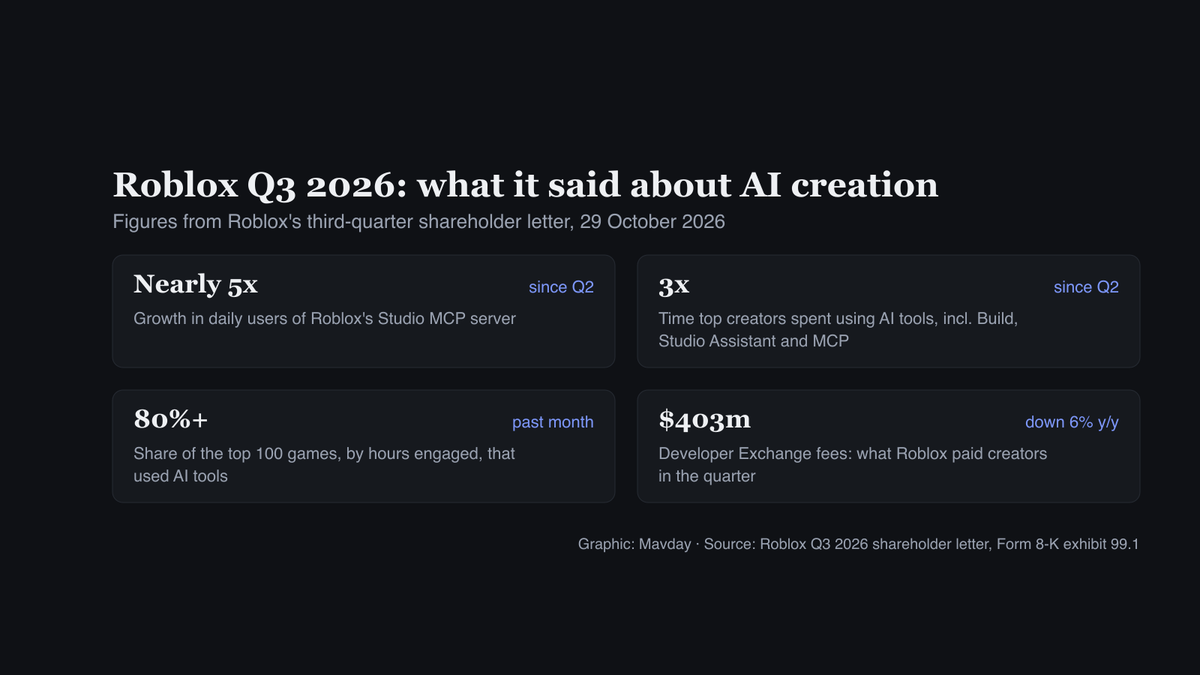
The Q3 2026 letter, filed on 29 October, went further. Since Q2, it said, time spent using AI tools, including Build, Studio Assistant and “external AI via MCP”, “tripled among our top creators, and those using our MCP server daily grew nearly 5x.” More than 80% of the top 100 games by hours engaged used AI tools in the month before the letter, and “multiple games built almost entirely with our Studio MCP connector” broke into the top 20 by concurrent users. Roblox doesn’t give the base numbers behind those multiples.
Payouts fell from a year earlier: Developer Exchange fees were $403m, down 6%, on revenue of $1,572m. As a share of bookings they rose, to 24% from 22%, after Roblox raised its DevEx rates. We cover the rest of the letter in our Roblox Q3 2026 results piece.
FAQ
Why is my Roblox MCP not working?
Three causes come up most. Old guides point to archived servers. Since 19 August, tools need a studio_id and set_active_studio is gone, which breaks older prompts. And in Claude Code, one of the plugin’s two servers always shows as failed: only the one for your operating system connects.
Do I need a Claude API key for Roblox Studio?
Not for the MCP route. Roblox’s server and plugin ask for no key: Claude Code or Codex runs on whatever plan you already use. A key matters only if you want Roblox’s Assistant itself to run on Anthropic’s models, through the bring-your-own-key setting added on 21 February.
Can I use claude.ai or ChatGPT in the browser?
You can plan and write Luau with them, but they can’t connect to Studio. The README says Studio’s MCP server “runs on your computer”, so it needs a local client: Claude Code, Cowork, Codex, the ChatGPT desktop app or one of Studio’s quick-connect clients.