avday
avday On 29 October Claude Code built us a 5 by 4 metre room in Blender, headless, from a written floor plan. Every measurement was within 2 cm, and the sofa was a few boxes.
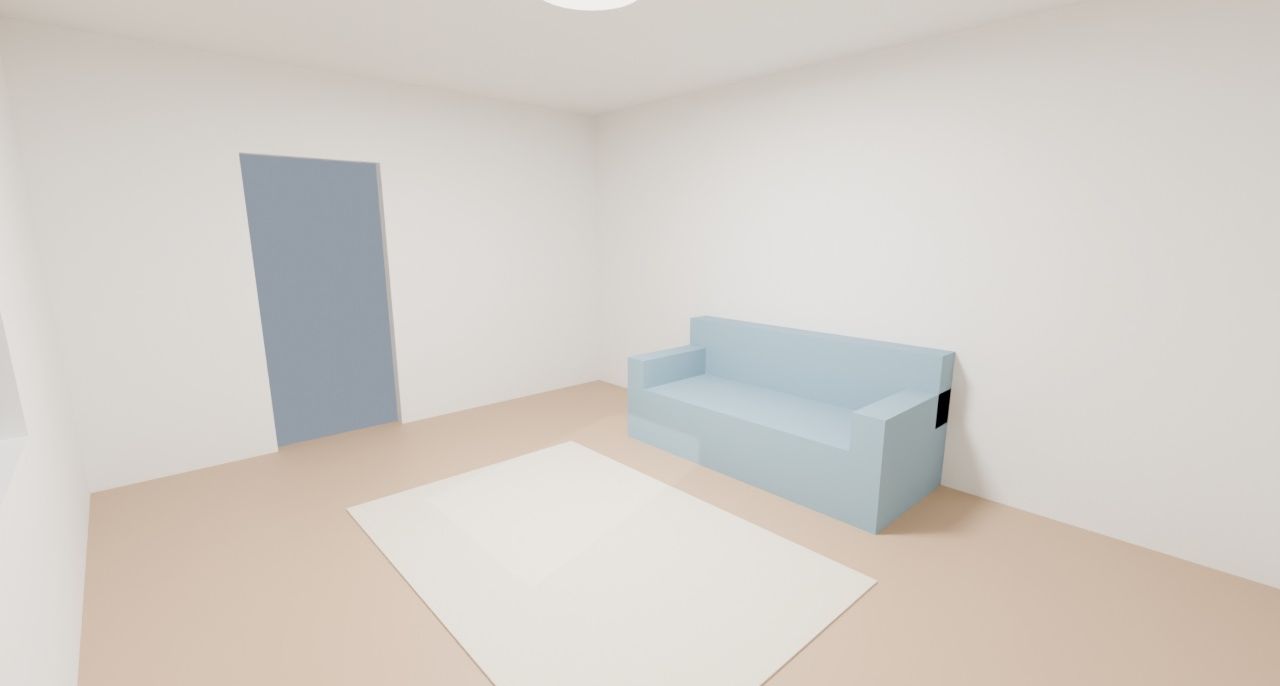
That is roughly where AI agents in Blender stand. They’re fast and exact at work you can measure: layouts, batch clean-ups, printable parts. Whether the result looks good is still a human’s call.
Connect an agent through a Blender MCP server instead, and it runs whatever Python the model writes inside your Blender. The official server’s own code says: “Note that this isn’t really a sandbox”.
Four routes from an AI agent into Blender
Three of the four routes have the model write Python for Blender’s bpy API. What differs is where that code runs and what the agent can see.
| Route | How it works | What you install | Best for | Watch for |
|---|---|---|---|---|
| Headless scripts | The agent writes a script and blender -b runs it with no window |
Nothing beyond Blender | Batch jobs and anything measurable | It can’t see; it checks by rendering |
| Blender Lab MCP (official) | Runs code in your open Blender, with screenshot, render and API docs tools | Blender 5.1 or newer, an add-on, the server | Working on a scene the agent needs to see | No real sandbox |
| MCP for Blender (community) | Runs code in your open Blender, plus asset libraries and 3D generators | Blender 3.0 or newer, an add-on, the server | Pulling in assets and generated models | No socket authentication; telemetry on |
| Computer use | The agent clicks the interface from screenshots | A desktop agent, ideally in a VM | Untested by us | About 1,000 to 1,800 tokens per screenshot |
Our pick: headless for anything you can check with numbers, because there’s no socket to secure and the script stays behind to rerun. Add the official MCP when the agent needs to see the scene. We didn’t test computer use, and the screenshot cost comes from Anthropic’s docs.
None of this is tied to Claude. The official server’s docs say it is “compatible with a myriad of clients”, with llama.cpp as their example for local models.
What our test showed: right numbers, basic design
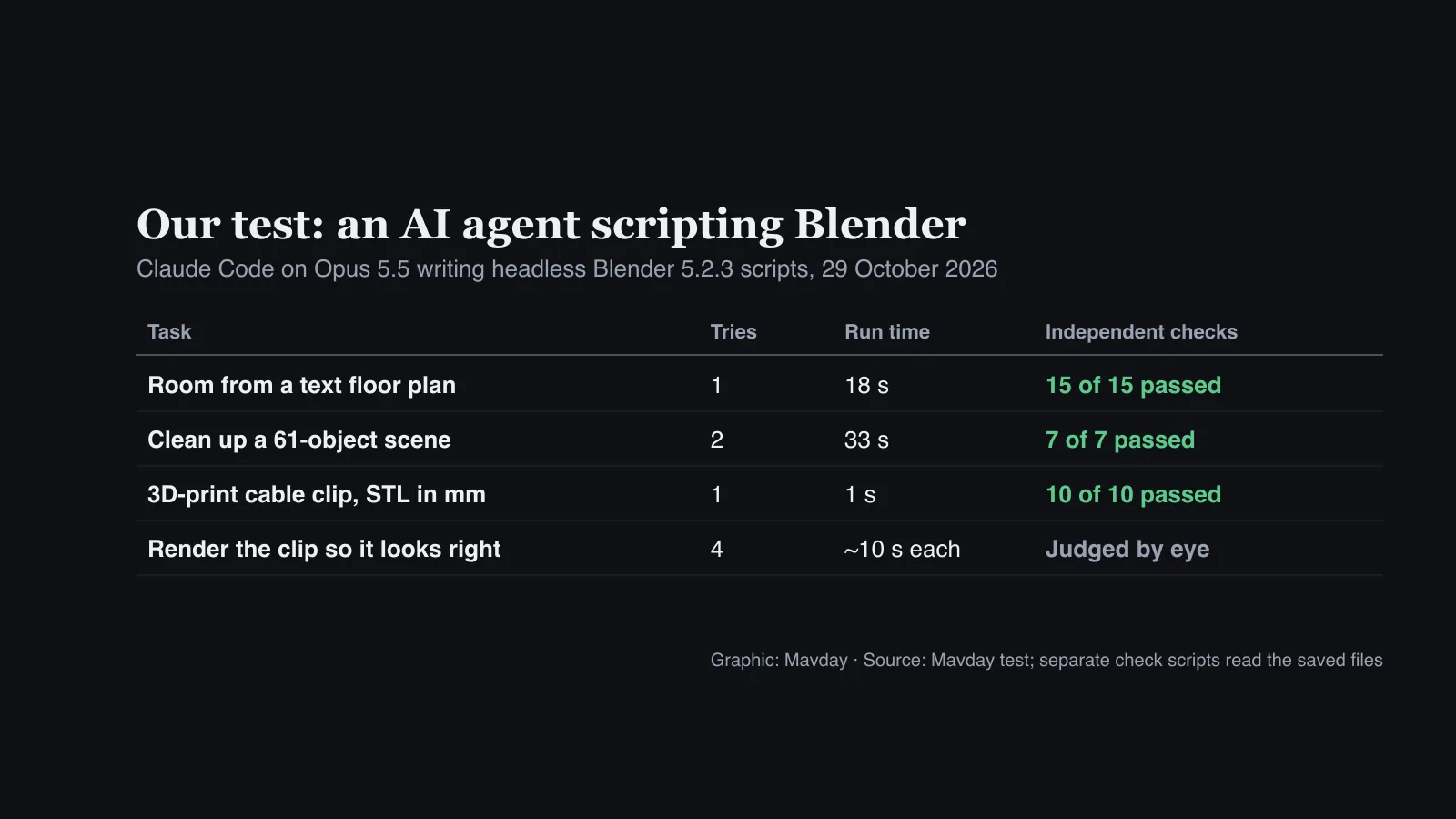
We ran three jobs on a founder’s MacBook Pro with Blender 5.2.3 LTS and Claude Code 2.1.306 on Opus 5.5, in an existing session. Anthropic had no part in it. We chose not to install third-party add-ons on a working machine, so we tested the headless route only.
Each prompt was fixed in advance, and a separate script opened each saved file and measured it. Three jobs are a spot check, not a benchmark:
- A room from a text floor plan, 5 by 4 m with a window, a door, a 2 m sofa, a rug and a light. First try, 15 of 15 checks passed.
- A scene clean-up: 61 badly named objects, three dense but tiny ones, eight unused materials and a missing texture. Second try, 7 of 7 checks passed.
- A 3D-printable cable clip for a 6 mm cable, with 2 mm walls and a 4 mm screw hole, as an STL in millimetres. First try, 10 of 10 checks passed.
The room, pictured at the top, shows the gap. Our checks ray-cast through the walls, and the window was 1.20 m wide with its sill at 0.90 m, as asked. Nothing floated. But the window is a bare hole with no frame or glass, and there’s a dark artefact where the sofa’s back meets an arm.
The clip was similar. Re-imported, the STL was watertight and one solid part, with every dimension on spec. But it has no countersink for the screw, nobody checked whether its snap opening flexes in PLA, and print orientation wasn’t considered.
Two things went wrong, and both are worth knowing.
The clean-up failed a check on its first try. The agent removed only materials with zero users, which misses the common case: materials left in an object’s slots that no face uses. Its report looked complete. Only our check against the known answer caught it.
The clip’s render took four tries. The lighting was too dark at millimetre scale twice, then leftover material slots from the boolean cuts blocked the colour. A headless agent can’t see its output, so it can be right in numbers and wrong to the eye. That’s the case for the MCP servers’ screenshots.

Where AI agents in Blender help, field by field
Strongest evidence first:
- Architecture and interiors. On 4 September OpenAI’s Thomas Ricouard showed Astra in Codex building an editable house in Blender, with a 900-frame walkthrough and five 4K stills. The post notes the plan “still needs professional review”.
- Pipeline and scene automation. Blender Lab’s tested uses include finding objects with high polygon counts that are small on camera, renaming data-blocks and debugging scenes. Simon Willison had Codex drive Blender with Python scripts on 5 September.
- 3D printing. Yadullah Abidi at MakeUseOf used the official server for cable clips. The parts “printed just fine on the first attempt”, but for snap fits Abidi would still use FreeCAD or Fusion 360.
- Previs and beginners. Dibakar Ghosh at How-To Geek, new to Blender, made a 45-second animation through the official server in about four hours. The robot in it floats above the ground.
Evidence is thin elsewhere: we found no documented case in product visualisation, and none in scientific visualisation. We cover game engines separately, starting with AI agents in Roblox Studio.
Where agents still fail in Blender
The bigger studies agree with us. BlenderWorld, from Zhejiang University, Alibaba and others, ran 13 agents on 223 tasks. In the paper’s words, “even the highest-scoring agents fully satisfy the rubric on fewer than half of the benchmark tasks.”
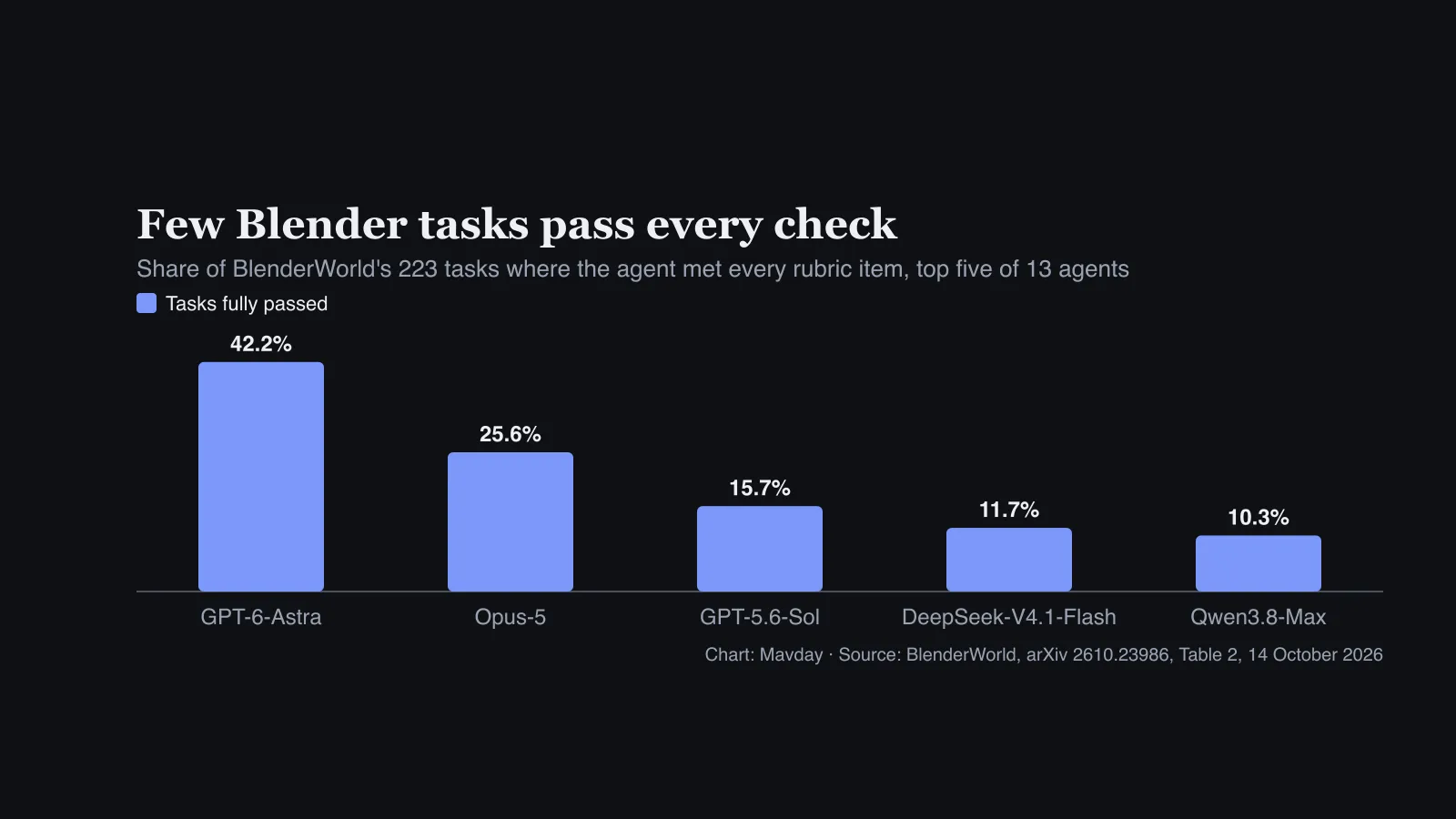
The failures it lists are visual, like our render problems:
- Contact: a character “visibly floats above the lawn”.
- Viewpoint shortcuts: people seen from the submitted camera vanish from other angles.
- Distortion: fine detail, such as a lion cub’s paws and eyes, comes out wrong.
Getting code to run is the easier part. In 3DCodeBench, from Google DeepMind and USC, Claude Opus 4.7’s scripts ran first time on 91% of tasks. Feeding error messages back lifted the average across models from about 70% to 97%.
At MakeUseOf on 24 September, Bryan M. Wolfe found the community server’s agent “just picked dimensions that looked about right”. It floundered on a broken Geometry Nodes setup, and Blender crashed once mid-test.
Blender MCP security: both servers run any code they’re sent
Either server lets a model run Python inside Blender, which can read and write your files like any program. Blender Lab’s page warns its server runs model code “without any guards in place to protect your data from removal or being sent to a remote location”. It recommends a virtual machine or a system without sensitive information.
What we found in the code and the issue trackers, worst first:
- The community socket has no authentication. Issue #404, “Unauthenticated Blender socket executes Python code”, opened on 21 October and had no reply by 29 October.
- The official “sandbox” isn’t one. Its
weak_sandbox.pyblocks only a handful of calls that quit Blender or reset its settings. - The community repository was hijacked in August. Nous Research’s Hermes Agent dropped its integration on 10 August, saying the repository was hijacked on 8 August and the maintainer had reported the account compromised. New commits and releases under the maintainer’s account resumed on 16 August.
- Four advisories so far. Three that GitHub’s database rates low were published on 3 June. A medium-rated path traversal in the Poly Haven download, CVE-2026-66004, was published on 24 July and fixed in version 1.6.5.
- Safe mode is off by default.
BLENDER_MCP_SAFE_MODE=1checks the model’s scripts against an allowlist. Its code calls it “a guard on what the model can be talked into, not a sandbox around Blender”. - Telemetry is on. The community server sends an anonymous usage record unless you set
DISABLE_TELEMETRY=true. Sending prompts, code and screenshots has been opt-in since 21 September. - Both servers use port 9876, so run one at a time. The official add-on also needs Blender’s Online Access setting on, or it won’t start.
Prompt injection is the quieter risk. Asset names and descriptions from online libraries reach the model’s context, and models do run commands nobody asked for, as Qwen did in Cohere’s sandbox test.

Set up an AI agent in Blender safely
A short checklist, safest first:
- Prefer headless when the job allows it. A script run with
blender -bopens no socket at all. - Use a separate machine, VM or user account for MCP work, with no client files or credentials on it.
- Work on copies of your
.blendfiles. Agents save over things. - Install from the source, the Blender Lab extensions repository or the community project’s PyPI package, and pin the version.
- Harden the community server with
BLENDER_MCP_SAFE_MODE=1andDISABLE_TELEMETRY=true. - Run one server at a time on localhost, and stop it when you’re done.
- Lock down the agent itself. In Claude Code, use deny rules and the sandbox from our permissions guide. The sandbox fences the agent’s shell, but an MCP server runs outside that fence.
- Check the output yourself, with a script or a render you look at, as leading developers do with coding agents.
What it costs to run an agent in Blender
Blender, both MCP servers and headless scripting are free. You pay for the model:
- Our test ran inside a founder’s existing Claude Code subscription, at no extra cost.
- Ghosh’s animation used “around 26%” of one session’s usage on Claude’s $20 Pro plan.
- On the API, a developer who logged 72 Claude Code runs with the community server put everyday tasks at $0.16 to $0.23. They also build a token-saving proxy, which gives them an interest in the numbers.
- Generators cost extra. The community server’s hosted Premium plans start at $10 a month, or you bring your own API keys.
Mixar bundles an agent into a Blender fork
Mixar is the all-in-one option: a GPL fork of Blender 5.2 with an AI chat agent and 3D generation built in. Version 4.3.6 came out on 28 October. The catch is where the AI runs:
- On Mixar’s servers. The README calls the backend “a separate, closed-source service”, and the AI features need an account. Even “local models” are relayed through it.
- With your ChatGPT token. To use a Codex subscription, Mixar reads
~/.codex/auth.jsonand sends the access token through its backend. - With many providers. The privacy policy of 25 October names nine AI providers, and desktop usage analytics are on by default.
For someone who wants one app, that may be a fair trade. For client work, it deserves a security review first.
Blender itself keeps AI at arm’s length
On 28 April Anthropic said “The Blender developers have created an MCP connector, which is now officially available for Claude”. Blender named Anthropic a Corporate Patron of its development fund.
After pushback from its community, Blender took the money as a one-off donation on 1 May. “We should have opened up more conversation and perspectives from contributors before making this decision,” it said.
On 2 June Francesco Siddi, the Blender Foundation’s chairman, ruled out generative AI features in Blender. Any AI features must be “local and sovereign” and assistive, and a reply in the same thread calls the MCP server “the Blender MCP experiment”.
Our take
The harder limit is taste. Agents in Blender give you a correct blockout fast, and the benchmarks agree they rarely finish the job alone. Let them do the measuring, and keep a person on the looking.
Start headless, which in our test was quick and needed nothing installed. Add the official MCP when the agent needs to see the scene, in a VM or a separate account. The community server is the most capable and the least guarded: give it the full checklist before it touches real work.